The Next Big Race in AI: Who Wins Video — Sora or Runway?
Text-to-video is no longer a distant dream; it has become the most exciting race in artificial intelligence today. Two names are leading this charge: OpenAI’s Sora and Runway. And the real question we’re all trying to answer is simple — who will control the future of video creation? Will it be the research giant known for pushing the boundaries of realism, or the creator-first platform that has already found its way into the daily workflow of millions?
To understand this race, we first need to acknowledge why AI video is becoming the next frontier. Over the past decade, the internet has shifted massively toward video as the dominant medium of communication and engagement. Today, most of the world’s online traffic comes from video content, and creators, brands, and studios spend billions every year on production, editing, animation, and storytelling. With budgets rising and timelines shrinking, the industry is waiting for one breakthrough — a tool that can generate long, realistic, controllable video at scale. Whoever builds that capability doesn’t just win a technology milestone; they win the entire attention economy.
This is where Sora made its entrance, shaking the industry with its breathtaking realism. The first samples looked less like AI-generated scenes and more like footage from professional cameras. Every frame carried an almost uncanny sense of physics, shadowing, texture, and motion. It was clear that Sora wasn’t just generating videos — it was generating a believable world. But like any breakthrough, it came with constraints. Sora remains largely inaccessible, functioning more like a research exhibit than a tool ready for everyday creators. And realism alone is not enough; creators need control, layers, precision, and the ability to tweak every element until it matches what’s in their imagination.
This is exactly where Runway excels. While Sora stunned the world, Runway quietly focused on becoming a creator’s studio. Its models, even if slightly behind Sora in raw photorealism, offered something arguably more important — usability. Creators could mask objects, add motion, revise scenes, iterate quickly, and integrate the tool into existing workflows. Runway didn’t wait to perfect the science; instead, it shipped, refined, and grew a loyal base of filmmakers, editors, and brands who value speed and flexibility over perfection. The contrast between the two platforms couldn’t be clearer: one delivers astonishing realism, the other delivers immediate creative control.
Changing outfit in a video genetated using Runway
And this contrast leads us to the heart of the race. Sora stands tall as the model with the highest fidelity, but without widespread access, it risks becoming a beautiful demo rather than a daily tool. Runway, meanwhile, may be less groundbreaking in raw technical output, but it is already shaping how videos are produced across industries. The race is no longer about who can generate the prettiest video — it’s about who can generate the most usable one. If that is very, very clear to you, then the winner will ultimately be the platform that balances realism, control, speed, and affordability, because that is what determines adoption at scale.
_______________________________________________________
Now, let me explain how you can use Runway to create your own public-ready video in simple steps:
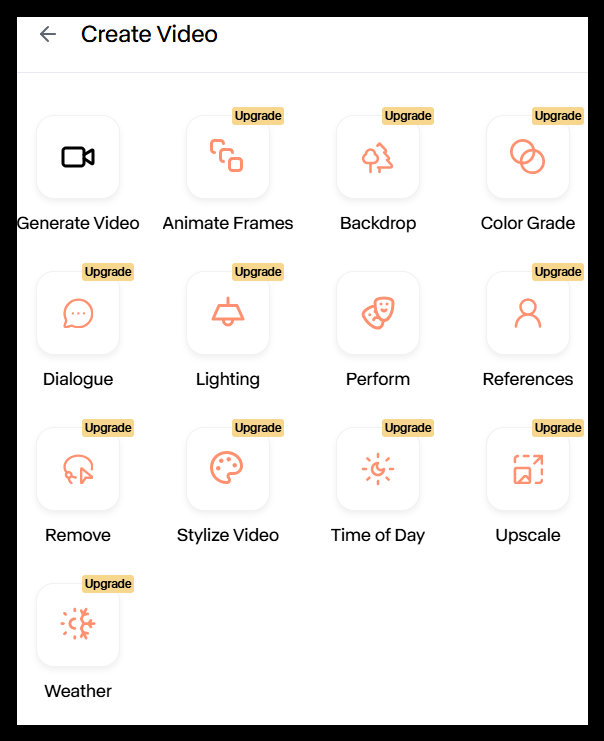
When you open Runway’s Create Video panel, you see a whole toolbox for building or editing videos. Think of each icon as a separate “skill” the AI has — you pick the skill you need, give instructions, and the model handles the rest.
Here’s what each feature does in everyday terms:
1. Generate Video
This is the main option.
Just describe the scene you want — like “a drone shot of mountains at sunrise” — and Runway creates a fresh video from scratch.
2. Animate Frames
Useful when you already have a drawing, image, or scene in mind.
Upload a picture, and the AI turns it into an animation — like making a still image move or act.
3. Backdrop
If you want to change where a scene takes place — a room → beach, street → futuristic city — this tool swaps the background while keeping the main subject intact.
4. Color Grade
For creators who care about vibes:
Make your video look cinematic, vintage, warm, cold, dramatic, etc.
Think of it like Instagram filters—but for AI videos.
5. Dialogue
Add spoken lines to your video.
Tell the AI what a character should say, and it animates the mouth movement to match.
6. Lighting
Similar to a film set where you adjust lights:
You can brighten the scene, add shadows, mimic sunset lighting, and more.
7. Perform
If you want characters to perform actions — waving, dancing, turning — this controls their movement.
8. References
Upload reference images to guide the AI’s style.
For example, provide a character photo, and the AI will generate a video in that same style.
9. Remove
Want to delete something from the scene — a car, a person, clutter?
This tool cleans the scene automatically.
10. Stylize Video
Turns any video into a particular art style — anime, watercolor, cyberpunk, hand-drawn sketch, etc.
11. Time of Day
Changes morning → evening, day → night, golden hour → cloudy.
A painless way to get different lighting versions of the same scene.
12. Upscale
Improves video quality.
Useful for making videos sharper, smoother, and with higher resolution.
13. Weather
Adds fog, rain, snow, sunlight beams, storms — without touching the rest of the video.
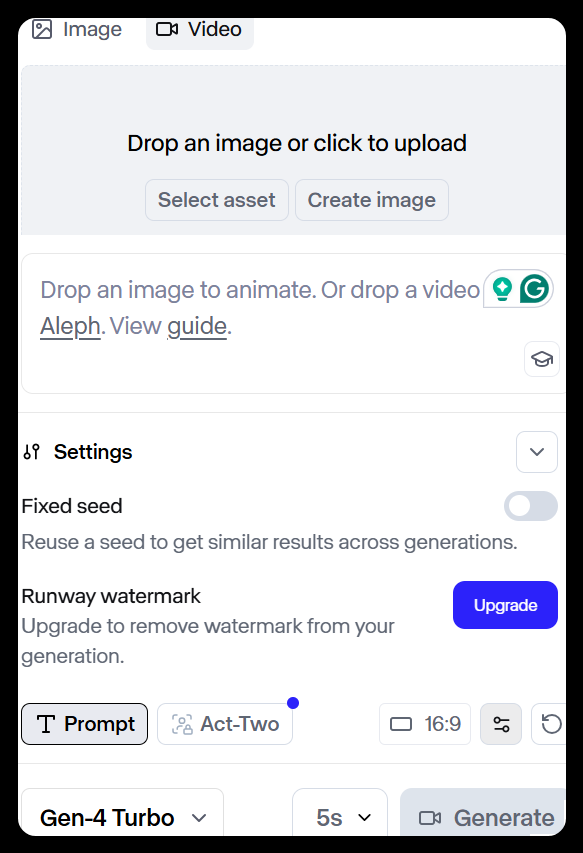
The above image shows the page where the real creation happens.
Upload or Generate Inputs
You can either:
- upload an image to animate,
- upload a video to edit,
- Or click Create image to first make assets using Runway.
Settings Panel
A few important switches:
Fixed Seed
If you want similar results every time you generate a video, turn this on.
Great for clients or multi-shot scenes that need consistency.
Runway Watermark
Free users get a watermark.
Upgrading removes it.
Prompt Box
This is where you type your instructions:
- “A dog running through a neon city”
- “Create a slow cinematic shot inside a library.”
- “A woman walking through snowfall in Tokyo”
You can also use:
- Act-Two (Runway’s story structure tool for more advanced, guided generation)
Aspect Ratio Button
Choose whether your video should be:
- 16:9 (YouTube)
- 9:16 (Reels/TikTok)
- 1:1 (Instagram square)
Model Version
This is the engine that generates your video.
Gen-4 Turbo is currently the fastest and most advanced model for quick, high-quality outputs.
Duration
Choose how long the video should be:
2s, 5s, 10s, etc.
Generate
Once you hit Generate, Runway starts building the video based on your prompt, settings, and assets.
So coming back to SORA vs Runway, where we started and where the big debate still is! So who wins?
The answer may not be as straightforward as choosing one name. If OpenAI turns Sora into a fully accessible, creator-friendly ecosystem, it could redefine filmmaking overnight. But if Runway continues shipping rapidly, expanding its toolset, and integrating deeper creative controls before Sora becomes publicly available, it might secure dominance simply by being the platform people rely on today rather than tomorrow. In essence, Sora might win the technology race, but Runway might win the adoption race — and in AI, adoption has a history of beating innovation.
The likely future of AI video will not revolve around a single winner. Instead, we may see the ecosystem split naturally: Sora becoming the gold standard for hyper-realistic, cinematic generation, while Runway grows as the go-to platform for practical creativity and fast production. Other players like Pika, Luma, and Kling will form specialized layers around them. But one conclusion feels inevitable — AI video is entering its gold rush phase, and the race between Sora and Runway is only the beginning.
See you in our next article!
If this article helped you explore and understand the Runway tool, check out our recent stories on Lovable 2.o, MAI-IMAGE 1, Assembly AI, Dialogue AI, and Gumloop AI. Share this with a friend who’s curious about where AI is heading next. Until next brew ☕